The WiFi Hacker for PC that you lot are looking for might be the one we are talking about in this article. Equally you lot tin see, there are many ways recently that one can hack a Wi-Fi network. With the rising of so many Android apps existence adult every single day, it is anticipated that the WiFi hacker for PC is besides happening anytime soon!
It is not ethical to hack WiFi networks, especially if the Wi-Fi is not yours or you lot take neither right nor permission to do annihilation with it. It is considered illegal, and yous could be penalized if defenseless in the act. But if you want to acquire to hack your own Wi-Fi network because your router is interim up or simply for educational purposes just, we tin can help you with that.
We accept prepared a couple of ways for you to get admission to those Wi-Fi passwords. And we but chose the ones that are easy to do. We sympathise that non everyone knows anything almost computer coding, so we will not employ those methods. If annihilation, y'all volition only accept to blazon in a couple of words and short commands. Other than that, it will be pretty much download, install, and open.
Contents
- one Download AndroDumpper for PC
- ii WiFi Hacker for PC: AndroDumpper Wifi
- 2.1 View Saved WiFi Password (A)
- 2.2 View Saved WiFi password (B)
- ii.3 SmartKey Wi-Fi Password Recovery
- 2.iv Wi-Fi Password Decryptor
- two.five Some Important Notes
Download AndroDumpper for PC
| Proper name | AndroDumpper v3.eleven |
| Size | 10.94 MB |
| Requirement | Windows vii/8/10 |
| Author | Osama Abukmail |
WiFi Hacker for PC: AndroDumpper Wifi
Now, this method is the one that is widely used on all Android devices. The AndroDumpper Wifi exploits the weaknesses of the router'southward WPS function. And since this is for Android devices, we will teach you how to apply this as a Wi-Fi hacker for PC Windows. Also cheque, how to download YouTube Vanced on Android to get ad-free video.
Android apps and games basically practise not work on the Windows operating system. Luckily for you, there are many workarounds on the Windows platform that were developed recently. And one of them is the use of an Android emulator that runs Android apps on Windows devices. The nearly pop of those emulators is the BlueStacks app player.
Time needed:10 minutes.
Here is what y'all should exercise.
- Download BlueStacks
Download a BlueStacks installer from the official website or use our download push button to give you a copy of the installer.
The file is effectually 400MB, so it might take you lot a little longer than usual, especially if you have a slow internet connection.
Here is a proposition: Use a download manager to accelerate your download speed upwards to five times. Attempt using the IDM software. - Run installer
When you finally have the installer, double-click on it to outset the installation.
Cull an installation folder or just opt for the Windows default Program Files folder. - Launch BlueStacks
As soon equally the installation finishes, observe the BlueStacks icon on the desktop. Double-click on the icon to launch the emulator for the get-go time.
You will exist greeted by a short instruction on identifying the controls inside the emulator to make information technology work as a normal Android environment. - Download AndroDumpper Wifi APK
Now leave the BlueStacks for a moment and let it run in the groundwork. Please notice the download button for the AndroDumpper Wifi APK and click on it to start the download.
- Install APK in BlueStacks
When the download is over, double-click on the APK file or elevate and drop the APK to the BlueStacks interface to automatically install the AndroDumpper Wi-fi.
- Yous're all set!
After a few seconds, you may employ the WiFi hacker on your PC.
Only open the AndroDumpper Wifi and cull the Wi-Fi network that you want to hack.
Reminder:
The AndroDumpper Wifi is only effective if the Wi-Fi network SSID is visible and not hidden. Also, this will be most effective if the Wi-Fi network has not been inverse from its default SSID and countersign. Otherwise, the app will have a hard time decoding the countersign and will take a longer fourth dimension.
View Saved WiFi Password (A)
- Permit's start with a fundamental arroyo. Use the laptop or Windows tablet that is using wireless connectivity or WiFi to the network. Note that just your devices that connect to the network through Wi-Fi are eligible for this method.
- Boot it upward properly and when you are on the Windows main desktop, printingWindows primal + R on your keyboard.
- TheRun service volition pop upwardly—blazon in theCMD and press Enter.
- On the CMD window, type in this command:netsh wlan show profile proper name=prophethacker key=articulate
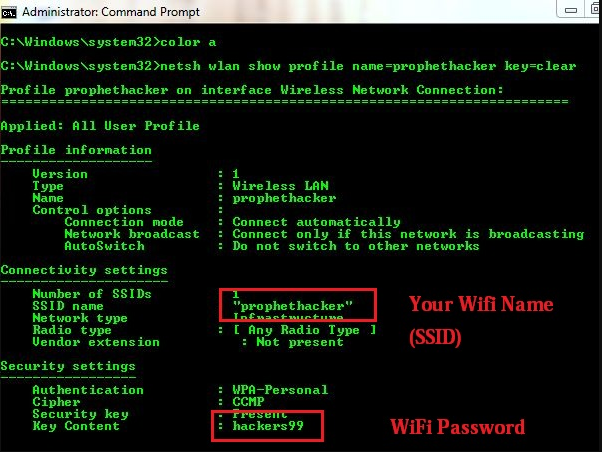
- Make sure to change theprophethacker with your WiFi network name.
- On the post-obit issue, look for theFundamental Content. Information technology is the one that shows your exact Wi-Fi password.
View Saved WiFi countersign (B)
- This is another mode to view and find out the saved WiFi password from a Windows laptop, tablet, or PC that uses a Wi-Fi dongle.
- Again, on your Windows primary desktop, press theWindows key + R to launch theRun service.
- On theRun service, blazon in theNCPA.CPL
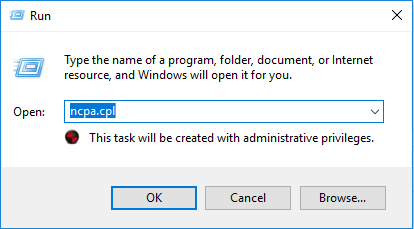
- You should run across theNetwork Connections window pop upwardly. Now double-click on the WiFi adapter that you are using.
- On the next window that will appear, click on theDetails button.
- In another window, you lot should see theSecurity tab. Click on it.
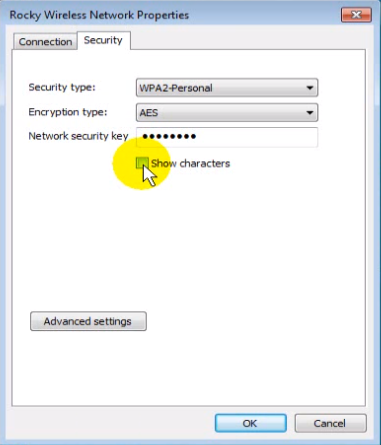
- On theNetwork Security surface area, you volition find a serial of dots. That is the WiFi password. To run into it, just tick and check theShow Characters below it, and information technology will testify you your exact Wi-Fi password.
SmartKey Wi-Fi Password Recovery
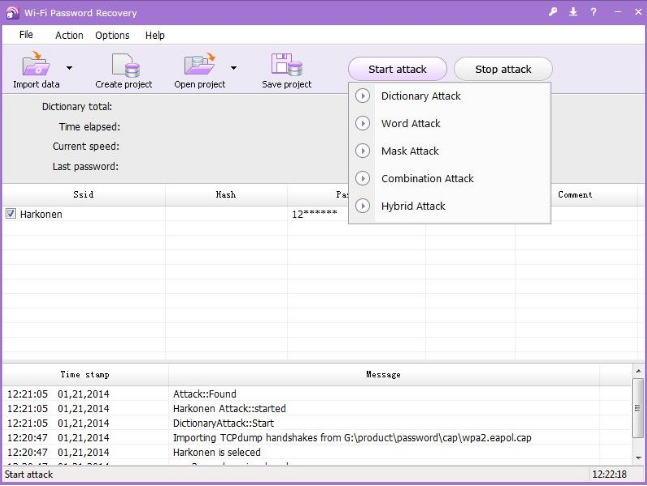
There are many WiFi hackers out there that claim to exist the best at what they do. They tell you things that imply that they know what they are doing by using technical words and jargon. But there are just a few that actually live up to its words. And in this role of the field, the SmartKey Wi-Fi password Recovery dominates the competition.
The SmartKey WPR is compatible with Windows 7 to Windows 10 operating organization. And then if you are using older versions, we cannot actually give you physical promises that information technology volition piece of work. But some reports say that it works, so try at your own accord. The SmartKey WPR uses five avant-garde Wi-Fi password recovery or detection.
- Hybrid Attack
- Dictionary Assault
- Mask Attack
- Discussion Attack
- Combination Attack
No matter how potent the combination is, information technology will somewhen be cracked past SmartKey WPR. Information technology uses the most sophisticated pattern and combination that fifty-fifty up to 64 graphic symbol countersign is no match for this software.
For users who will cull this software for hacking the WiFi network, just be reminded that the speed of the software volition depend on the processing power of the device's CPU and GPU. Then do non expect that y'all will get the result in simply a few minutes. It volition only be possible to exist quick if the password combination is 1 of those common ones. And this Wi-Fi hacker for PC works even while offline.
Finally, if you are interested in using the SmartKey WPR, yous should know that this only comes free for a flow of fourth dimension and with limited features. To get the full version, you must pay $50 from their official site.
Wi-Fi Password Decryptor
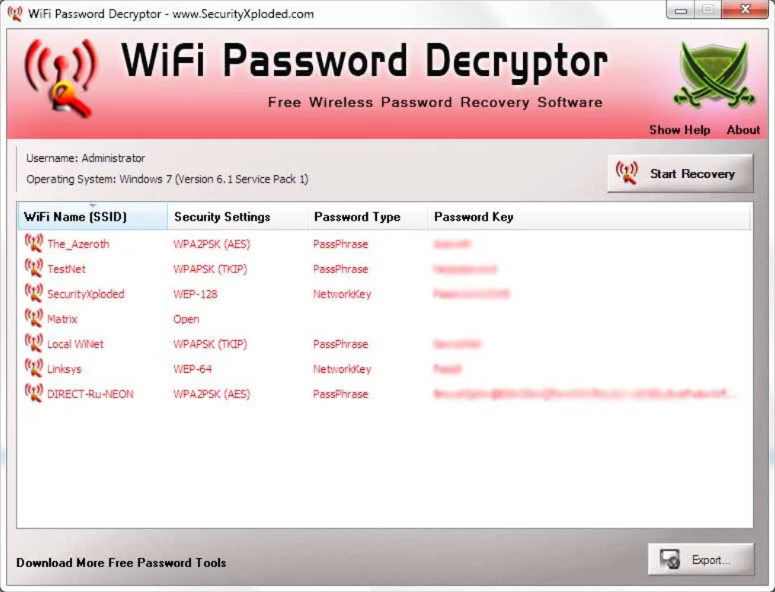
If you lot want a free WiFi hacker for a PC, the Wi-Fi Password Decryptor might help you with that. This might not have the best Wi-Fi hacking engineering, but this also works nearly of the time.
The interface of the Wi-Fi Password Decryptor is pretty straightforward. You lot get precisely what shows right in front of you. And the buttons will tell you exactly what information technology does. So whether you are a no-knowledge person or an avant-garde user, this will piece of work for you the same way it worked for everyone else.
The Wi-Fi Password Decryptor is not compatible with Windows XP, so if your laptop is on that operating system, you might as well surrender or use the first ii methods mentioned higher up. Windows Vista and later volition run this software but fine.
Some Important Notes

These are the virtually used and the easiest amid the hundreds of means to crack WiFi networks. The ones on this list should provide yous with the password that you lot demand. Simply if you however cannot hack your way through the Wi-Fi network, perhaps it's time to reset your router or maybe ask someone that knows the password.
I will accept to remind you once again that hacking others' Wi-Fi networks and passwords are non a good thing. Information technology is considered stealing, and you can make it trouble for information technology. And then endeavour not to use these methods for those purposes.
So which method are you going to utilize? Have you tried any of the methods hither before reading this article? If then, which one is information technology and did it work at the time you applied it? Tell us almost your experience in the comment section below, and let us know your opinion about whatsoever of these methods.
If y'all have questions or any suggestions regarding this article'southward topic, you may leave your message down below. We will read them as soon every bit nosotros can and maybe consider them for our next topic. And please, if you have other methods that are non listed here that you lot experienced worked for you, be a kind person and share them with the states!
DOWNLOAD HERE
Posted by: donofrioatill1939.blogspot.com


0 Komentar
Post a Comment